
If something doesn't work on your device, you can report it to us from the app. We also receive your device's log, which helps us find the cause.
Before you send a report:
Always update your device to the latest version, then check whether the issue is still there.
Restart the device and also your modem or router. Many issues go away after a restart, so this alone may fix it.
If the issue comes back, restart the device, make the issue happen again and send the report right away. Part of the log is erased at every restart: this way, the issue is the first thing in it, and we can find it quickly.
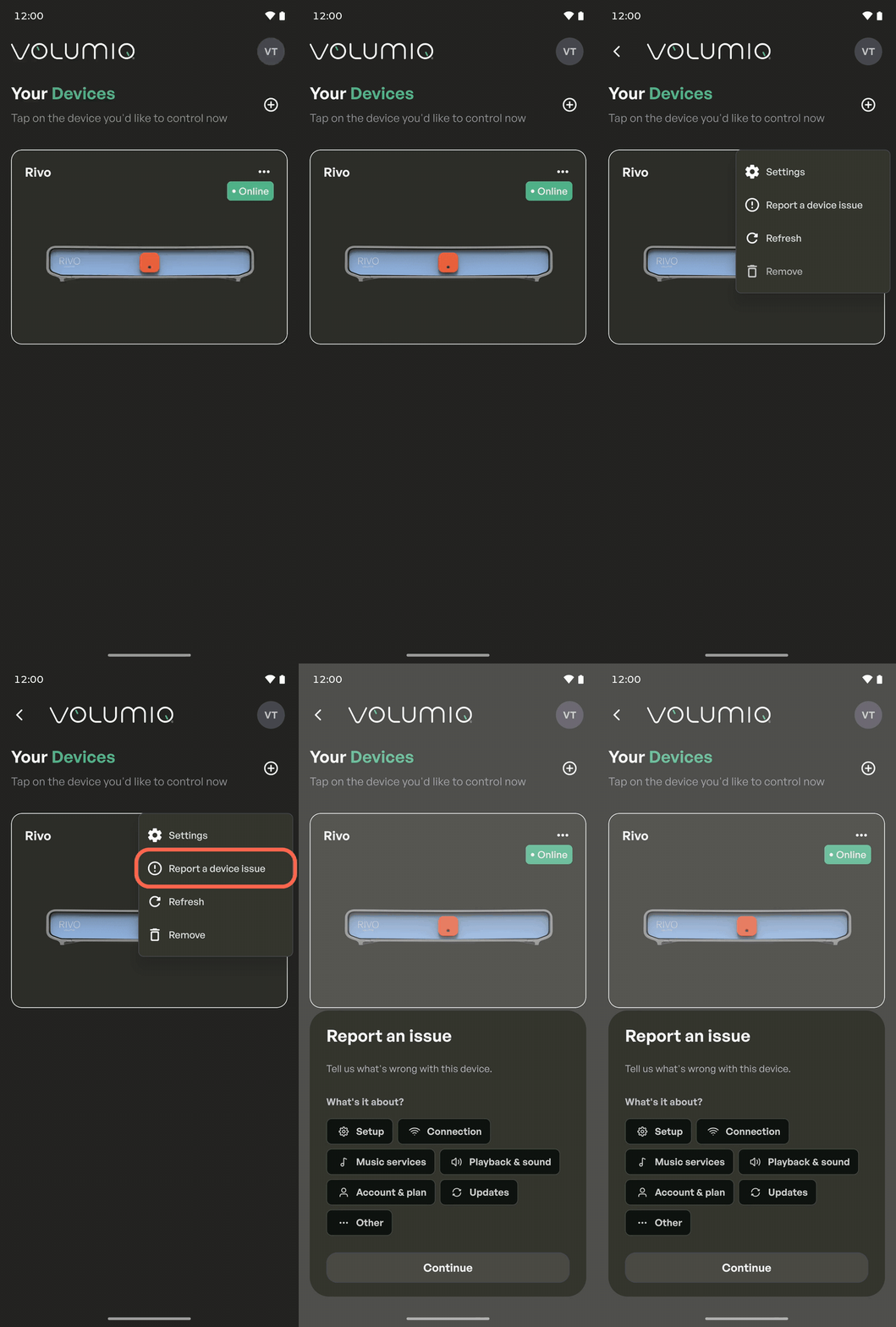
If updating and restarting didn't work, here's how to send a bug report:
Open the app.
Tap the
⋯three-dot icon in the top right corner of your device card.Select
Report a bug.Choose the issue's category and press
Continue.Type your issue inside the text field and then press
Send.
When doing so, please describe the issue you're facing in as much detail as possible. The more detailed it is, the easier it will be for us to understand the problem: the steps to reproduce the issue, the type of network you're using, any connected devices (such as DACs, hard drives, or other inputs), and any other relevant information.