When your Volumio device does not work as expected, crashes or fails in particular conditions, the only way to understand what goes wrong is usually by looking at logs.
Volumio features an integrated facility to collect logs of your system and publish them in a way to offer developers a clear way to understand what is broken on your system.
Here the step guide:
Navigate to http://volumio.local/dev or http://yourvolumioip/dev, where 'yourvolumioip' is the actual IP addess of your device eg. 192.168.1.54
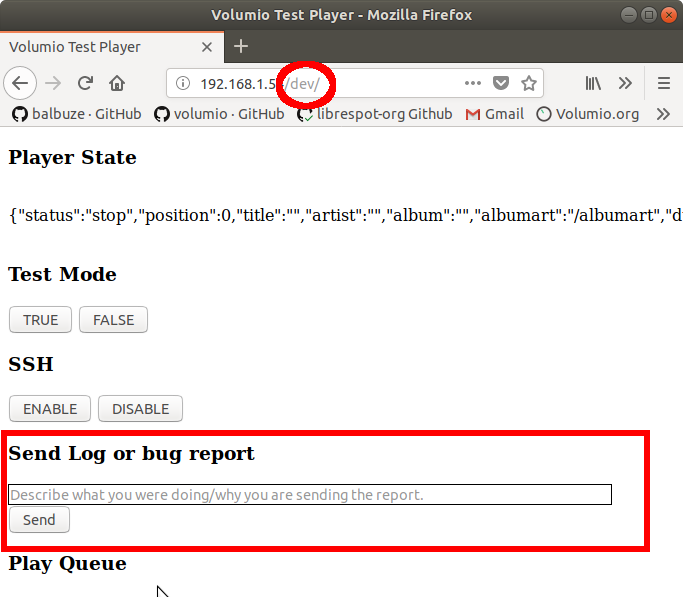
This will open the "DEV" page
Scroll until you see a section called "Send logs of bug report"
Fill the text field with a clear, but short description of your problem
Click on Send
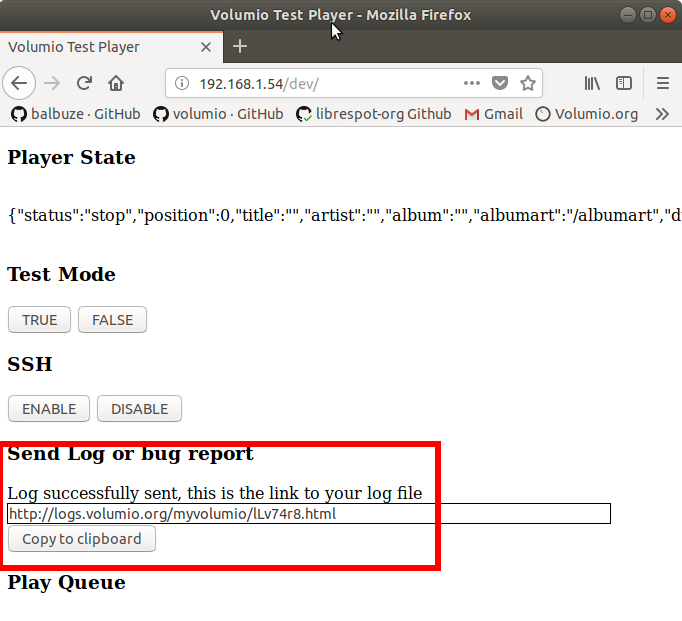
Once the logs have been successfully sent, you will see a link like "http://logs.volumio.org/xxxxxx"
Press the copy button to copy the link to your logs in your clipboard and use this link to add-on to the support ticket